LinkedIn comment examples for consultants: 10 to copy
Ten LinkedIn comment examples for consultants and coaches, by post type, with why each works and how to swap in your own facts.

Part of our LinkedIn comments guide: where to comment, what to write, and how to measure what it earns.
A good LinkedIn comment for a consultant makes one point from your own work, in two to four sentences. Below are ten examples for the five kinds of post your buyers write most, with why each works.
Treat them as patterns. Every example uses an invented detail, because yours must be real. If you paste one under a post unchanged, you are doing the thing readers and LinkedIn now push back on.
What do good LinkedIn comments for consultants look like?
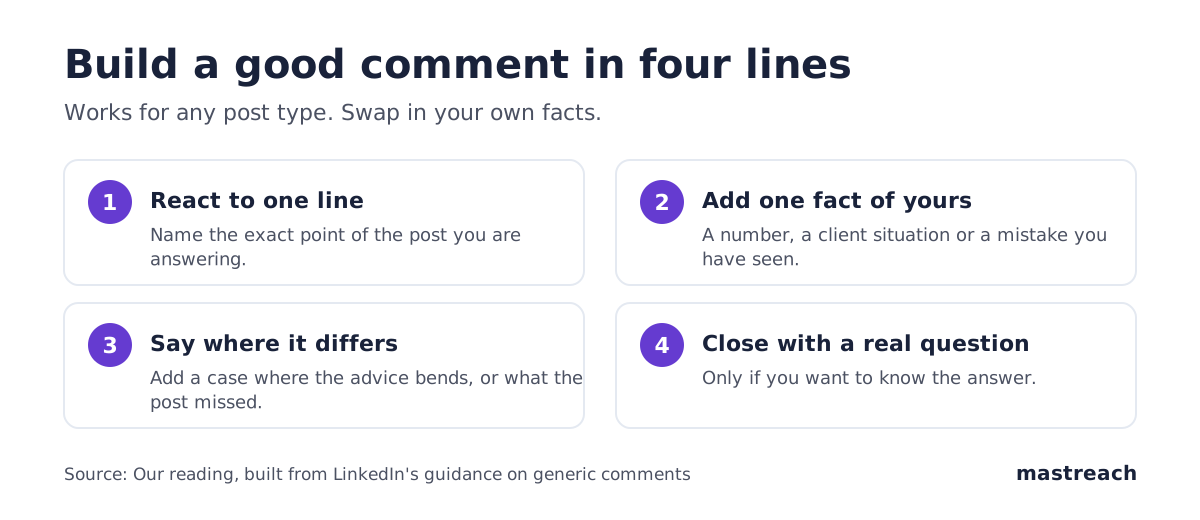
They share four traits. They answer one line of the post. They add one fact only you have. They say where the advice bends. They sound like a person talking.
LinkedIn is clear about the other side. In June 2026 it said it is acting against responses that simply restate the original post and against comments posted at scale by automation. It also says it is fine to use AI to help you write, as long as the comment carries your own voice and view.
So the test for every example is the same: could a stranger have written this without doing your job? If yes, add a detail.
How do you comment on an opinion or hot-take post?
Agree in part, then add the case where the advice bends. That is more useful to the author's readers than applause, and it shows judgement.
Example 1 (a UK operations consultant, post: "Stop writing long proposals"). "Agree for repeat clients. With new ones, I send a one-page summary first and the detail only after a call. The long version lost us a manufacturing client who never opened it. What has worked for you with first-time buyers?"
Why it works: it agrees, limits the claim and gives one real moment. Cut: the final question if you do not want the answer.
Example 2 (a US agency owner, post: "Fire clients who haggle"). "Mostly true. The exception for us is the client who haggles because their finance team makes them. We fixed that by offering a smaller starting scope at full rate. Nobody had to discount."
Why it works: it pushes back politely with a practical fix. Cut: "Mostly true" if you would rather open with the fix.
How do you comment on a client story or case study?
Do not congratulate. Name the one detail that made the result possible, or the one question a buyer would ask.
Example 3 (a Dubai advisory firm, post about a client cutting onboarding time). "The part I would underline is the sign-off step. In our own projects, onboarding stalls most often where one approver sits outside the project team. Did you bring that person in early?"
Why it works: it shows you know where such projects fail. Cut: any praise that comes before the point.
Example 4 (an Indian founder, post: "How we won our first enterprise client"). "Useful to read. Our first enterprise deal took five months because security review started late. Starting that review in week one is the one thing I would copy from your story."
Why it works: it trades a real, slightly awkward fact for the author's. Cut: "Useful to read" if the next sentence already says it.
How do you comment on a data or report post?
Pick one number, and say what it means for someone who has to decide something. Do not repeat the figures back.
Example 5 (a Sydney coach, post about a staff-turnover survey). "The number that stands out to me is the gap between managers and staff on feeling heard. In the teams I coach, that gap is usually the first thing to close, and it costs nothing. Did the report say how it varies by team size?"
Why it works: it picks one finding and connects it to practice. Cut: "stands out to me" if you are short of words.
Example 6 (a German finance consultant, post: a market report). "One caution on the headline figure. It covers listed companies, and our mid-sized clients rarely behave like them. For a family firm, I would read the second chart first."
Why it works: it adds a limit to the data, which readers value. Cut: "One caution on" can become "Caution:".
How do you comment on a hiring or new-role post?
This is where many comments turn generic: "Congratulations, great move!" Add something small and true, and keep it about the person.
Example 7 (a US executive recruiter, post: a client announcing a new head of sales). "Congratulations to the whole team. The first ninety days in this role usually come down to one thing: agreeing early which accounts are really the new head's. Wishing Sam a clear start."
Why it works: a short congratulation, then one specific insight. Cut: the name if you do not know the person.
Example 8 (a UK consultant, post: "We are hiring our first finance manager"). "If it helps, the thing candidates ask us most in this role is who they report to in month one. Answering that in the job post would save you a round of interviews."
Why it works: it helps the author, with a practical tip. Cut: "If it helps" if you are confident.
How do you comment on a question post?
These posts invite answers, and they are often read for days. Answer the question first, then give your reason.
Example 9 (post: "What is the one tool you cannot run your practice without?"). "A shared notes document for every client call. Nothing clever. It means anyone in our team can pick up a conversation without asking the client to repeat themselves."
Why it works: it answers in the first sentence and gives a reason. Cut: "Nothing clever" if you want it more confident.
Example 10 (post: "What would you tell your younger self about pricing?"). "Quote the outcome, not the hours. My first three clients paid by the day. When I quoted for the result, the conversation changed from my time to their problem."
Why it works: a clear piece of advice from one lived change. Cut: "My first three clients paid by the day" only if it is untrue for you.
Which comment openers should you cut?
Remove anything that could sit under any post. These openers add nothing:
- "Great post!" or "Love this!"
- "So true." with no reason after it.
- "Thanks for sharing."
- A restatement of what the author just wrote.
For comment length, see how long a LinkedIn comment should be. For the signs readers use to spot filler, see how to tell if your comment is AI slop.
CoachCraft, a vendor, makes the same point for coaches: specific comments get profile clicks and generic ones do not. It is a vendor view, so read it as practitioner advice, not proof.

How do you make an example comment your own?
Use this three-step check before you post any comment, including ones you drafted with help:
- Replace every detail. Swap the invented client, number or city for a real one from your work. If you have none, do not comment on that post.
- Read it aloud. If you would not say it to the author over coffee, rewrite it.
- Check it fits your subject. Comments inside the one subject you sell teach readers what you are for. The comments guide explains why.
Post it yourself. LinkedIn's help page says it may limit the visibility of comments if it detects excessive comment creation or use of an automation tool.
Where Mastreach fits
The hard part of a good comment is not the wording. It is finding the right post and remembering the one fact you should add. Mastreach is built for that part.
- It shows posts in your subject that your buyers are reading.
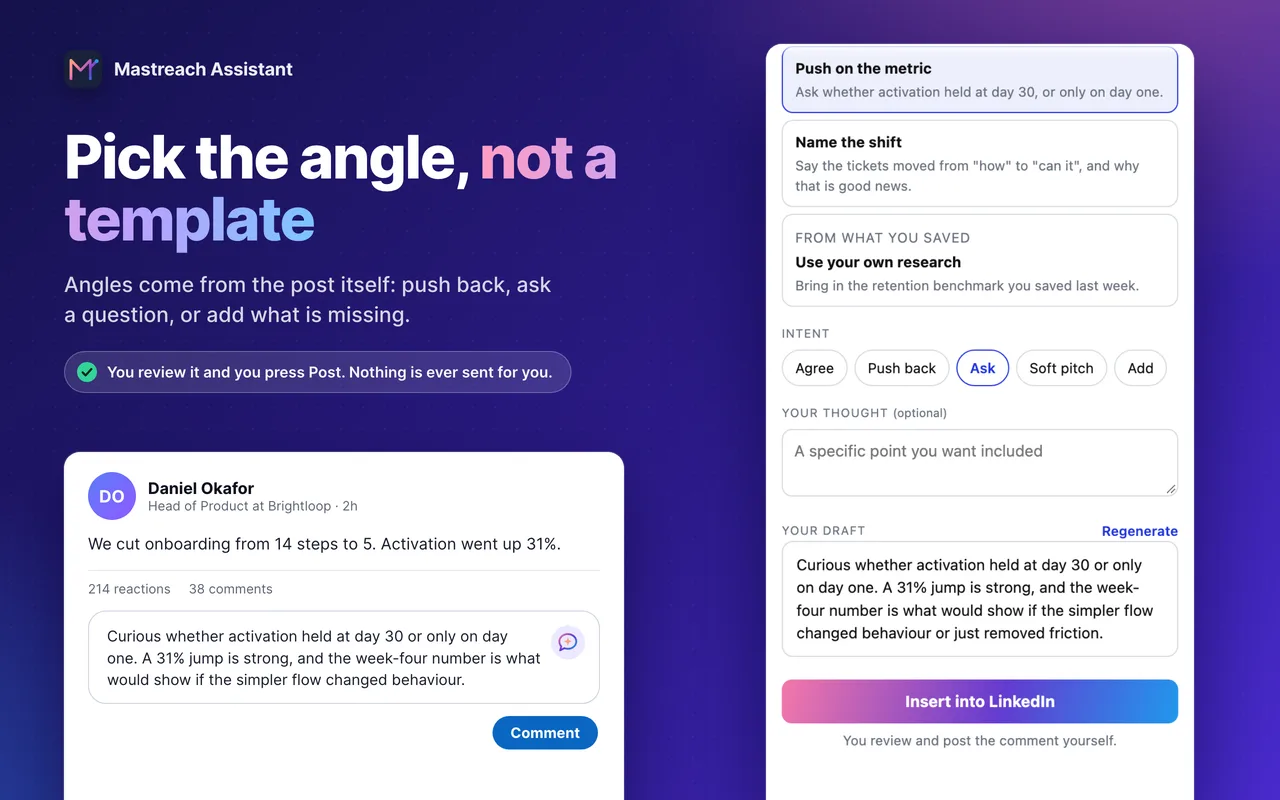
- On any post, you pick an angle (push back, ask, add what is missing) and get a draft in your own voice.
- It saves pages and notes you keep, so later drafts can draw on your own material.
You read, edit and post every comment yourself. Mastreach never posts or messages for you.
Plans start at $29 a month at the founding price. The 5-day free trial needs a card but charges nothing during the trial.
FAQ
How long should a LinkedIn comment be?
Usually two to four sentences, enough for one specific point. Length matters less than whether you add something the post did not say.
Can I copy these LinkedIn comment examples?
Use them as patterns only. Replace each detail with a real one from your work. Copied comments sound generic, and LinkedIn says it is acting against generic, restated replies.
Should a comment end with a question?
Only when you want the answer. A real question can start a thread with the author. A reflex question at the end of every comment reads as a template.
Is it safe to use AI to draft comments?
LinkedIn says it is fine to use AI to help you write, if the comment shows your own voice and view. Edit the draft, add your fact and post it yourself.
Sources
See what your own comments are reaching.
Mastreach finds the LinkedIn posts your buyers are reading, drafts a comment in your voice, and counts the impressions LinkedIn never adds up for you. You post every comment yourself.
- 914 comments drafted with Mastreach and posted by their owners
- 177,931 LinkedIn impressions on those comments, August to September 2026